
Step 1: Create New Account
Step 2: Sign In and Create Ads
Create Free Text Ads
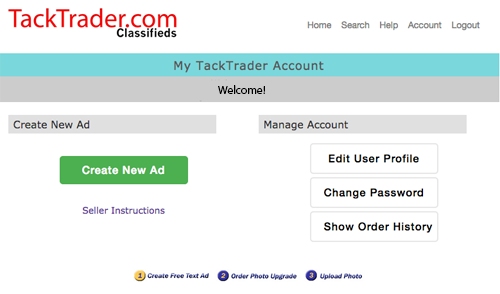
Your TackTrader Account
is where you Add and Edit Ads, View Ad Responses,
Update User Profile, and Order and Upload Photos.
Step 3: Upgrade to a Photo Ad
Once your text ad is online, you can upgrade to a photo ad.
- All Photos Run for 90 days
- Photo Ads Include Hit Counter
- Single-Photo Ad for Small Items (priced under $500)
- Single-Photo Ad for Larger Items
- Small-Item Gallery Ad (priced under $500)
- Large-Item Gallery Ad
- Only $5 to Renew a Photo
- See prices on our order form
- Great Value!!
Example: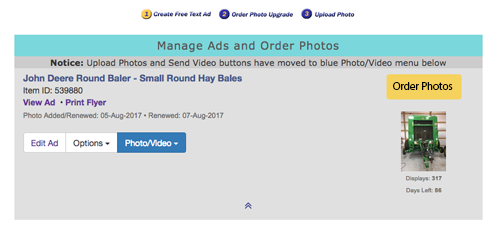
Upgrading to a Photo Ad is very Simple!
- Click the gold Order Photos button in your TackTrader Account
- Scroll Down the Customized List of Photo Ad Options
- Click Add to Cart on the photo ad of your choice
- Click Continue Shopping to order a photo ad for another item
- Click Checkout to complete your order
Our SECURE shopping cart supports Visa, MasterCard, American Express, Discover, PayPal, online check, and postal mail orders.
Step 4: Send Us Your Photo
After your order has been completed, please send us your photo.
- Option 1: Image Uploader (recommended):
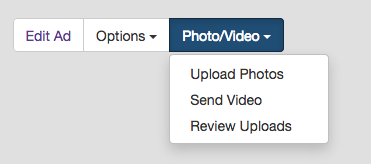
- Sign In to your Account and click the blue Photo/Video button, then select Upload Photos.
- Option 2: By Email:
- Email one photo at a time directly to: photos@tacktrader.com
- Option 3: Dropbox:
- Very large image files may be sent via our Dropbox.
Example:
For more information, please visit our Support Center.
DreamHorse Support Center
Help Desk Tickets • Knowledge Base/FAQ
Thank You for Using TackTrader.com!